Most people open Claude or ChatGPT, leave the model on whatever it was last set to, and use it for everything. A quick email, a long research question, a piece of code: it all goes to the same model.
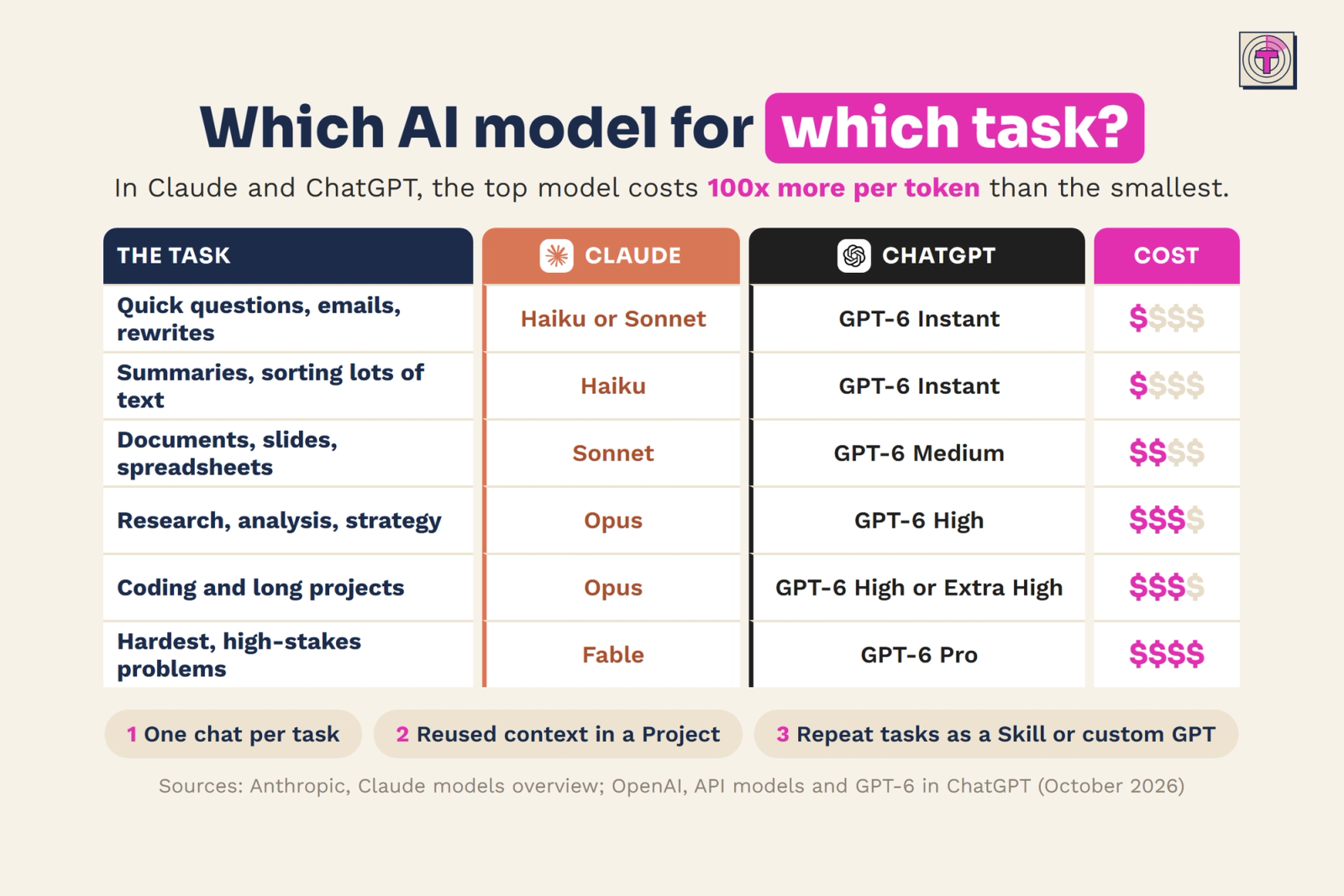
That habit is expensive. In both Claude and ChatGPT, the top model costs 100x more per token than the smallest one. Using the most powerful model for a quick rewrite is like hiring a consultant to fix a typo. It works, but you pay for capacity you never use.
This guide shows how to match the AI model to the task, so you get good results without burning tokens.
Why choosing the right AI model matters
Every message you send to an AI model costs tokens, and some models cost far more per token than others.
The difference between models is not small. When the largest model costs 100 times more per token than the smallest, the choice of model becomes one of the biggest levers you have. A team that sends every simple question to the top model spends its budget on work that never needed that model.
Choosing well is not about always picking the cheapest option either. It is about fit: the smallest model that does the job well.
Which model to use for which task
Both Claude and ChatGPT offer a range from light and fast to heavy and thorough. In Claude you choose between models such as Haiku, Sonnet, Opus and Fable. In ChatGPT, GPT-6 runs at different levels, from Instant to Extra High, with GPT-6 Pro at the top.
Here is how to match them to everyday work.
Quick questions, emails and rewrites
For short, clear tasks you do not need deep reasoning. Use Claude Haiku or Sonnet, or GPT-6 on Instant. These tasks have one obvious goal and little room for interpretation, so a light model handles them well.
Summaries and sorting lots of text
When you need to summarise documents or sort and categorise a large amount of text, the work is repetitive and well defined. Claude Haiku or GPT-6 on Instant fits here. Because these jobs often involve volume, the savings of a small model add up quickly.
Documents, slides and spreadsheets
Creating a structured document, a slide outline or a spreadsheet asks for more than a quick answer, but it rarely needs the strongest model. Claude Sonnet or GPT-6 on Medium gives you the balance between quality and speed that this kind of work needs.
Research, analysis and strategy
Questions that require weighing information, comparing options or building an argument benefit from a model that reasons more carefully. Use Claude Opus or GPT-6 on High. The extra cost is justified because a better answer here changes decisions.
Coding and long projects
Coding and long, multi-step projects need a model that can keep track of a lot of context and follow through over many steps. Claude Opus or GPT-6 on High or Extra High is the right choice.
The hardest, high-stakes problems
Save the top tier, Claude Fable or GPT-6 Pro, for problems that are genuinely hard and where the outcome matters a lot. These models are the most capable, and the most expensive, so they are worth it when nothing else gets you there.
Three habits that save the most tokens
Picking the right model is the biggest step. These three habits make an equally practical difference.
1. Use one chat per task
Long chats send the whole history along with every new message. That means a conversation that started with a report and drifted into emails and planning keeps paying for all of that context, every time. Start a new chat when you start a new task.
2. Put context you reuse in a Project
If you keep pasting the same background, instructions or files into your prompts, move them into a Project. That way the context is there when you need it, and you stop repeating it in every message.
3. Turn repeat tasks into a Skill or custom GPT
Tasks you do every week, such as a standard report, a recurring email or a fixed analysis, are worth setting up once. Build a Skill in Claude or a custom GPT in ChatGPT, so you explain the task once and reuse it every time after.
How to put this into practice
Start by looking at what you used AI for last week. If most of your prompts were short, everyday tasks such as emails, rewrites and summaries, those are exactly the tasks where a lighter model is enough.
Then make the switch a habit:
- Default to a light model for quick, everyday work.
- Move up only when the task asks for real reasoning, long context or high stakes.
- Start a new chat for each new task.
- Store recurring context in a Project, and recurring tasks in a Skill or custom GPT.
For teams, it helps to agree on this together. A simple overview of which model to use for which kind of work keeps everyone from defaulting to the most expensive option.
The key takeaway
Bigger is not better. The right fit is.
Matching the AI model to the task saves tokens. Save the strongest models for the work that truly needs them, and let the lighter ones handle the rest.