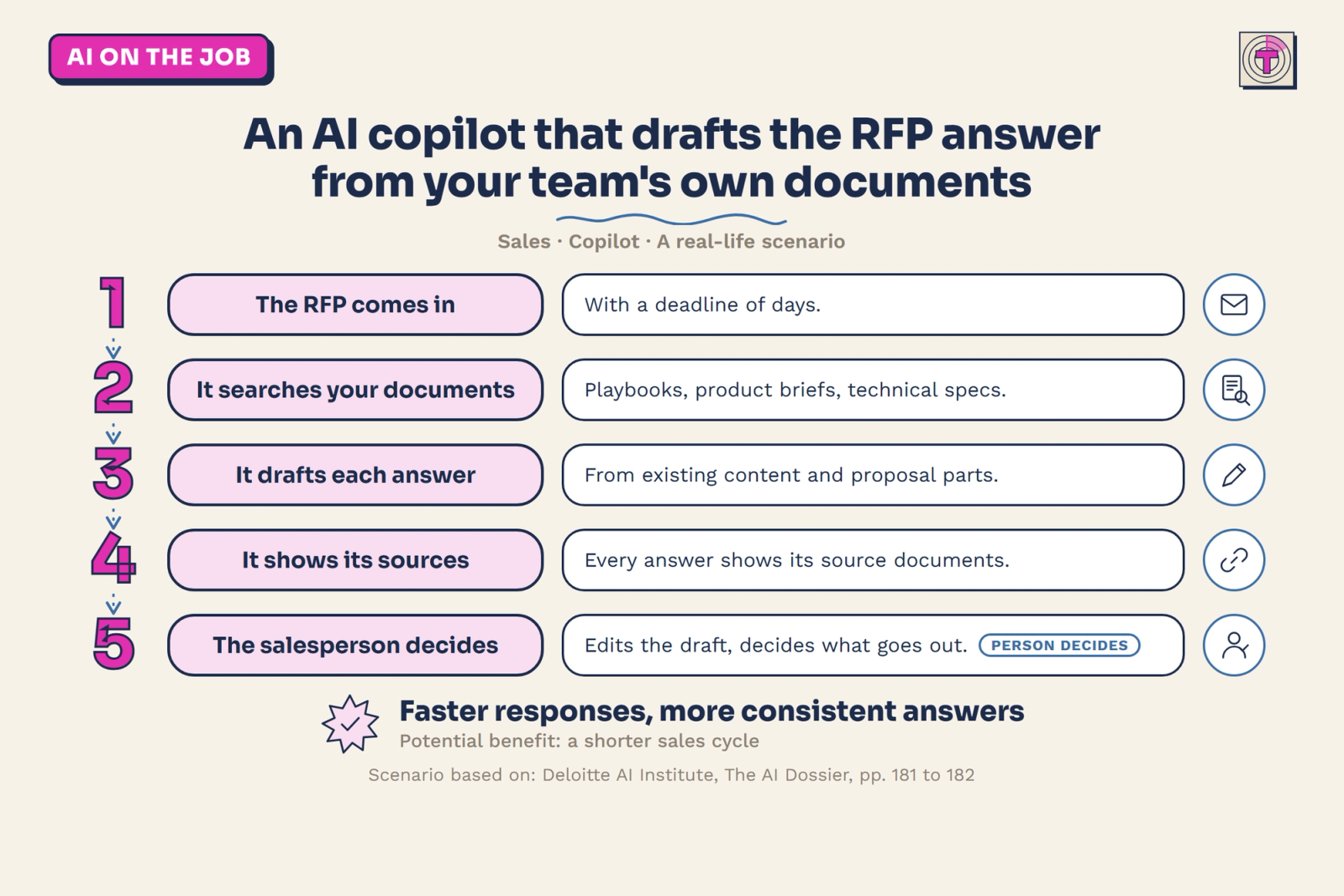
A big customer wants to buy, and before they do, they send a long list of questions. That list is called a request for proposal, or RFP. Your sales team usually has only a few days to answer it. This article looks at a scenario where an AI copilot finds the answers in the team's own documents and drafts the response, while a salesperson stays in charge of what goes out.
The case comes from Deloitte's AI Dossier, a collection of AI use cases. It is a scenario, not the story of one named company, so it shows what is possible rather than what one company measured.
The situation before: answers that exist but are hard to find
Responding to an RFP asks for detailed technical and commercial answers, often from several departments. According to the source, many sales teams have only days to coordinate all of it.
The knowledge needed is rarely the problem. It exists. But it sits in fragmented internal documentation such as sales playbooks and product briefs, and in other departments. The source names four things that slow a team down:
- manual processes
- scattered internal documents
- inconsistent proposal quality, and inconsistent reuse of knowledge across teams
- limited tools to pull out and combine the key information
In everyday terms: the team chases files and people, and every proposal comes out a little different.
What the AI does, step by step
In the scenario, an AI assistant takes over the searching and the first draft. Here is the flow:
- The RFP comes in, with a deadline of days. This is the trigger. Nothing changes about how the request arrives.
- The assistant searches the team's own documents. Salespeople can talk to a chatbot and quickly retrieve sales playbooks, technical specs, competitive positioning and customer references from the internal document repositories. In practice, the question "what do we say about X?" gets an answer from your own material, not from the open internet.
- It drafts each answer from existing content. The AI finds and summarises relevant internal content, aligns the answer with the internal knowledge bases and uses reusable proposal components. Building blocks that already exist get reused instead of rewritten.
- Every answer shows which documents it came from. The source calls this citation tracing. Users can see which source documents were used to generate each response, so they can check it quickly.
- A salesperson edits the draft and decides what goes out. The tools let users edit and review outputs before submission. The person approves the final response.
The source also notes that non-technical users, such as sales reps and subject matter experts, can draft proposals through a simple interface, with no prompts or coding needed.
Assistant or agent? Where this sits on the ladder
This case is a copilot. It works alongside the salesperson: it finds information and drafts answers, and the person approves every output.
That is different from an agent, which would carry out a whole task across several steps and tools on its own, within set rules. Here the AI never sends a proposal. The decision stays with the salesperson at the one point that matters most: what the customer actually receives.
The potential benefits: what the source does and does not say
The source is a scenario, so it reports no measured results. It lists these potential benefits:
- Faster deal cycles. Teams can respond to RFPs and prepare pitches and sales material much more quickly, which can shorten the sales cycle.
- More consistent, more complete responses. With central, AI-assisted access to knowledge, answers can contain fewer errors. The source adds that this could potentially improve win rates, especially for opportunities with time-sensitive budget windows. That is a possibility, not a result.
- More productive salespeople. Searching for materials and drafting proposals take less time, which frees people to focus on sales strategy, client relationships and personal follow-ups.
What it took
The source describes a scenario and not a deployment, so it gives no timelines, costs or team sizes. What it does describe is what has to be in place for the tool to be trusted:
- Documents in a place the assistant can search. The answers come from internal repositories, so the quality of the playbooks and product briefs sets the quality of the drafts.
- A review loop. Users can flag incorrect or incomplete responses. These flags are logged and reviewed in recurring quality checks.
- A fallback. A backup in case the AI models have problems, so the team is not stuck when a deadline is close.
Watch-outs
The source names three areas to design for:
- Reliability and transparency. Outputs need checking. Flagging wrong answers, showing the source of each answer and letting people edit the draft keep a human in control.
- Security. Data and model interactions should stay inside a secured internal environment, with no calls to outside services unless they are vetted and approved. Audit logs and role-based access controls help make sure only authorised people can see or generate sensitive proposal content.
- Privacy. The system should not log personal data unless a business rule requires it. RFPs and customer documents should be stored temporarily and deleted according to retention policies.
How to apply this in your own organisation
You do not need a large sales organisation to use the idea. The pattern: an assistant that answers only from your own documents, shows its sources and leaves the decision to a person.
- Spot the equivalent task. Look for work where the answer already exists somewhere in your documents but takes a long time to find. Proposals, tenders, security questionnaires and customer questions are common examples.
- Start with the smallest safe version. Gather your last few proposals and product sheets in one place, and let an assistant draft answers from that material only. A salesperson approves every answer.
- Get the basics in place first. Make sure the documents are current, decide who owns them, and agree who is allowed to see what.
- Always show the source. Ask for the document behind every answer, so checking takes seconds.
- Measure two things. Track how long a response takes from start to finish, and how many answers need correcting.
- Move up one step when it works. Once drafts are reliable, let the assistant prepare more of the response, with a person still approving what is sent.
Key takeaway
The idea is not to let AI answer your customers. It is to let AI do the searching and the first draft, so your salespeople can spend their time on the customer. Start with one document set, keep a person in charge of every answer, and expand as you learn what works.